.png)
How to Write an Integration Specification Document - 2026 Guide + Template + Claude Skill
A well-crafted integration specification document is the single most important factor in a successful software integration. It acts as the source of truth that aligns product, engineering, and other teams in your organization, preventing the costly missteps and scope creep that derail development.
This guide breaks down how to write a spec that accelerates your roadmap. We will cover the essential components, provide real-world examples, and include our comprehensive free integration spec template updated for 2026. We've also converted this template into a skill that you can download from Github and use in tools like Claude Cowork.
What to Include in an Integration Specification Document
A modern integration spec goes far beyond basic API requirements. It should be a complete business and technical blueprint. Here are the essential sections from our template. To get the full list, make a copy of this google document.
1. Integration Project Overview & Business Context
"Why are we doing this?"
This section provides a quick overview of the integration project, summarizing its purpose and the problems it solves. Keep it concise and clear enough for anyone to understand the core objectives.
- Target Customer Persona: Who is this for? (e.g., "Mid-market customers using NetSuite for accounting.")
- Jobs to be Done (JTBD): What specific user problem does this integration solve?
- Success Metrics (KPIs): How will you measure the business impact? (e.g., "Reduce customer churn by 5%," "Increase new feature adoption by 15%.")
Why it’s important: Without a clear overview, teams can easily lose sight of the big picture. We advise the customers we support to include this section so that everyone stays focused on the primary goals, preventing unnecessary detours or misunderstandings.
2. GTM & Commercial Strategy
“How do we get this to market?”
This section provides the details around how the integration will be priced, packaged, and sold. Customer-facing integrations are built to provide value to new and existing customers and can help secure the initial sale, ensure current customers renew, or expand existing customers. An integration is a product feature and must be treated as such.
- Pricing & Packaging: Is this included in a specific tier or a paid add-on?
- Marketing & Launch Plan: How will this be messaged to new and existing customers?
- Sales & CS Enablement: What training and documentation do internal teams need?
Why it’s important: Aligning with GTM teams on how the integration will be launched to customers ensures that integrations meet their intended revenue goals.
3. Integration Architecture Diagram (Optional)
"How does the data flow between systems?"
Insert a diagram that illustrates the data flows between the systems. A flowchart or data flow diagram can be particularly helpful here. Here’s an example that we include in our template.
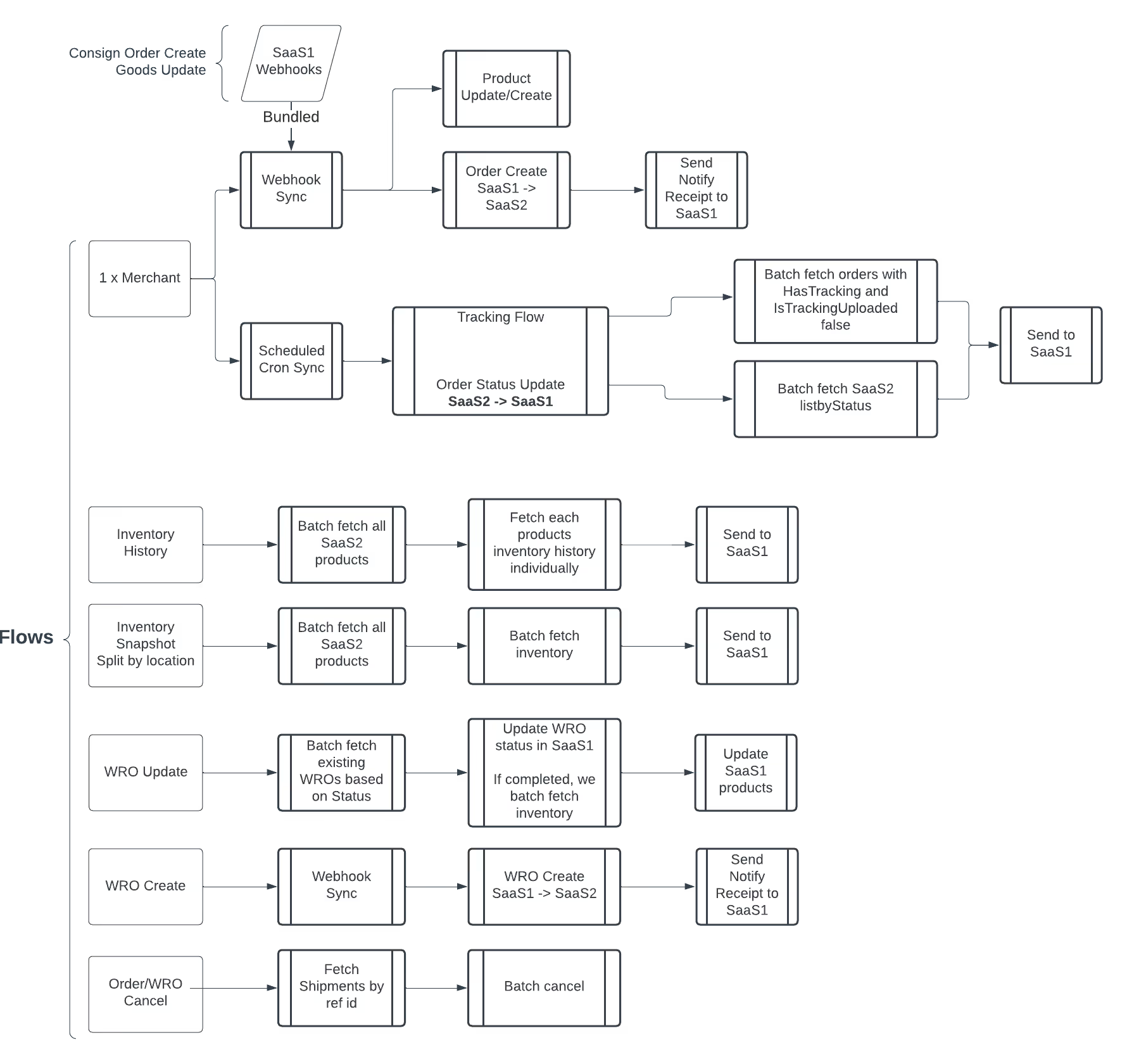
Why it’s important: Diagrams make complex data flows easier to grasp and can help prevent misunderstandings about how the integration should function.
4. Supported Data Flows & Field Mapping
"What data moves where and how does it get from point a to point b?"
This entire section is for outlining the key interactions between systems. Describe the main data flows that the integration supports, and for each data flow, provide a brief description of what happens when data moves from one system to another. Provide a detailed field mapping table that shows how data from one system maps to fields in the other system.
- Triggers & Cadence: What event initiates the sync? (e.g., A real-time webhook on "Order Paid" vs. a nightly batch sync.)
- Data Direction: Is the flow one-way or bi-directional? Which system is the source of truth?
- Field Mapping Table: Create a table that explicitly maps System A fields to System B fields.
Examples:
Why outlining data flows and field mappings for each is important: From our experience, clearly defined data flows make sure everyone knows how the different systems will talk to each other. By clearly laying out the key data flows, you're helping everyone—whether they're tech-savvy or not—understand what data is being shared, when it's happening, and in which direction it's moving. This kind of clarity is essential to avoid any mix-ups about how the integration is supposed to work.
Incorrect data mapping can lead to data loss or errors, so it’s important to get this right. Field mapping is like the translation guide between two systems. Each system might have its own way of naming or structuring data, so field mapping ensures that the data from one system is correctly understood by the other.
4. System Constraints & Expectations
“What are the technical limitations we need to be aware of?”
Integrations are reliant on the APIs and systems they connect to. Documenting what can and can’t be done with specific systems helps to ensure that the integration takes into account system constraints and is built in a way that accommodates those limitations. API Rate Limits: Note the requests-per-minute for both your system and the partner's.
- Payload Size Limits: Define how to handle syncs that exceed the maximum batch size (e.g., 10MB).
- Partner API Stability: Does the partner have a public status page or a history of downtime? What is their deprecation policy?
Why it’s important: Every system has its limits and documenting them prevents runtime failures.
5. Operability & Error Handling
“What happens when things don’t work as expected?”
In this section you can define how errors are categorized, logged and surfaced to people that need to be aware of them, and fix them. By defining this in advance, you can ensure that issues are dealt with quickly and effectively.
- Retry Logic: Specify an exponential backoff strategy for transient errors (e.g., retry 3 times over 5 minutes before creating an alert).
- User-Facing Error Messages: Define clear, actionable messages for the end-user (e.g., Instead of "Sync Failed," use "Your account credentials have expired. Please reconnect your integration.").
- Internal Alerting: Which errors trigger a slack alert versus a log entry?
Why it’s important: Plan for failure. A great spec defines how the integration behaves when things inevitably go wrong.
Get the Free Integration Specification Document Template
📥 Download: The Complete Integration Spec Template (2026)
Save dozens of hours and avoid common pitfalls. Our free Google Doc template includes pre-formatted sections for GTM, field mapping, error handling, and more.
Download the Integration PRD and Specification Skill
We’ve turned our this integration PRD and specifications template into a reusable AI skill that product teams can now use directly inside tools like Claude Cowork. Instead of copying prompts or rebuilding workflows from scratch, you can call the Pandium integration PRD and specification skill to generate structured, implementation-ready specs that follow your integration best practices. The skill will also research publicly available information about the systems and APIs you're looking to connect and draft all those details for you.
Because the skill runs wherever your team already works with Claude Cowork, product managers and partner managers can go from integration idea to draft PRD in minutes, then iterate collaboratively with engineering, GTM, and partners.
Get started by installing the integration PRD and spec writer skill from our GitHub project and adding it to your AI tool of choice.

Common Pitfalls & How a Good Spec Prevents Them
Here’s some of the common integration issues we’ve seen here at Pandium, and how a solid integration specification document can help mitigate these issues.
Scenario A: The "Duplicate Data" Disaster
The Problem: A marketing platform syncs contacts from a CRM, but duplicate records are flooding the system.
The Spec Solution:
- The spec’s Data Contract explicitly defined Email as the unique external ID.
- It included a Transformation Rule requiring all emails to be lowercased and trimmed of whitespace before matching.
- Result: Prevented thousands of duplicate records, preserving data integrity and saving hours of cleanup.
Scenario B: The "Black Friday" Failure
The Problem: An inventory tool needs to sync order status to an e-commerce platform during a high-volume sales event.
The Spec Solution:
- The System Constraints section noted the partner API’s strict "leaky bucket" rate limit algorithm.
- The Architecture section specified a queuing system to throttle outbound requests, ensuring they never exceeded the API limit.
- Result: Zero 429 "Too Many Requests" errors during peak traffic, ensuring every order was processed.
Scenario C: The “Nothing’s Happening” No-Gooder
The Problem: A customer’s newly installed integration to a data review site is showing new reviews, but not sending replies to those reviews.
The Spec Solution:
- The GTM & Commercial Strategy section noted that certain integration functions may not be available to customers on lower-tiered plans.
- The Operability & Error Handling section included specific customer-facing error messaging about API requests being unavailable on their plan tier.
- Result: Customer-facing documentation and customer support can ask the right questions and ensure that customers understand what functionality they can expect to be supported.
2026 Best Practices: Updating Your Integration Spec
The integration landscape is evolving. Ensure your spec accounts for these modern trends.
1. AI & Data Privacy
If your integration involves AI features, add a "Sensitive Data Handling" section. Explicitly define how PII (Personally Identifiable Information) is handled—is it masked, encrypted, or excluded entirely from syncs that feed AI models?
2. "Right-Time" Syncing
Don't default to real-time webhooks for every data flow. It's often unnecessary and resource-intensive. Your spec should define the business-acceptable latency. Does a user really need to see new contacts in 1 second, or is a 5-minute batch sync perfectly acceptable and more stable?
3. Integration Lifecycle & Versioning
Treat your integrations like products. The spec should include a section on Version Strategy. Define what constitutes a minor vs. major release and establish a clear policy for handling breaking changes from partner APIs. This prevents reactive, panicked fixes down the line.
Frequently Asked Questions
Q: Who should own the integration spec?
A: A Product Manager or Technical PM typically owns the document, but it requires heavy contributions from Engineering (for feasibility), Product Marketing (for messaging), and Partnerships (for external requirements).
Q: How is this different from a technical design doc?
A: A spec focuses on the interface between two systems (data mapping, user-facing behavior). A technical design doc focuses on the internal implementation (database schemas, server architecture) needed to build that interface.
Q: How does a spec help with long-term maintenance?
A: The Operability and Lifecycle sections are crucial here. When an error occurs six months post-launch, the runbooks in the spec provide a first-line-of-defense playbook for your support team. The versioning strategy ensures you can adapt to partner API changes gracefully.
Build Robust Integrations, Faster
Clear, comprehensive documentation isn't bureaucracy—it's acceleration. By standardizing on a robust integration specification document, you align your entire organization, reduce development cycles, and ship integration products that delight users.
Ready to get started?
Download the Free Integration Spec Template and see how much faster your team can move.
Looking for a platform to handle the underlying auth, infrastructure, and monitoring for you? Learn more about Pandium’s embedded iPaaS
From the Blog

What Dozens of Vertical SaaS Reviews Reveal About QuickBooks Integrations (And How to Build a Better One)